





How to use Osteoarthritis Friendly Website?

 two older women hulahooping

How to use Voltaren’s osteoarthritis friendly website

The web is constantly changing, making it almost impossible to keep up. And when osteoarthritis pain hits, it can be tricky to navigate even the most basic websites. That’s why Voltaren is here to help. We want to make sure that if you experience osteoarthritis in your hands or fingers, you not only keep up to speed with new technology, but actually get ahead of the game.

We developed the first osteoarthritis-friendly, mobile-first website experience. What does that mean? Basically, we know it can be difficult for joint pain sufferers to use their hands and fingers on mobile phones and other tech devices. We tested the following website features with osteoarthritis patients to optimise and validate these features so we can make your experience as simple as possible.

 Bigger Buttons
Bigger Buttons

All around our site, there are buttons and links that are bigger than you might normally see. The larger size is easy on the eyes and makes it simpler to find and tap these buttons and links.

videos, videos and more videos
Videos, Videos and More Videos

We know having to read too much text can be boring. We also know excessive scrolling can strain your hands and fingers (and your eyes!). To make our website easier and more fun to navigate, we have some short, easy-to-watch videos on exercises for pain relief.

 Man looking at smart phone
Head-Gesture Capabilities

Did you know you can navigate our website hands-free? By enabling head-gesture navigation on a compatible smartphone, you can scroll web pages just by tilting your head.

For those living with osteoarthritis, repetitive motion may exacerbate joint pain.1 Yet it’s hard to imagine life without texting friends, connecting with family on Facebook, and surfing the internet for cute cat videos—all of which require precise, repeated movements of your hands and joints in ways that can be terribly painful for osteoarthritis patients.

Luckily, some tech companies have made it easy to enable accessibility features to give your scrolling thumb a break. Well-known aids like Apple’s voice assistant, Siri, can help you use your phone via voice commands instead of your hands. But there are lesser-known tools built into your iPhone and iPad that provide osteoarthritis relief such as using head gestures to navigate.

If you’re not familiar with these options, you’re not alone: many people have no idea their smartphone is really that smart. Let’s introduce you to head-gesture navigation with this step-by-step guide.

 screenshot from iphone showing entering settings app

1. Grab your iPhone, go to your home screen, and find the Settings icon (it’s likely grey and looks like a gear).

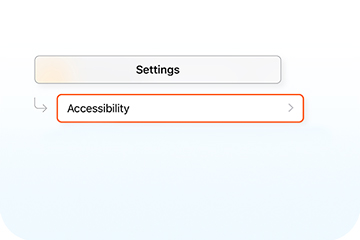
screenshot from iphone showing accessibility feature in settings app

2. Enter Settings, then tap Accessibility.

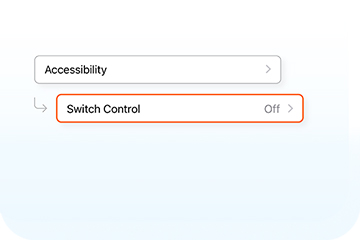
screenshot in iphone showing switch control feature in accessibility

3. A large list of Apple’s accessible offerings will appear. To set up head gestures, scroll down to Switch Control.

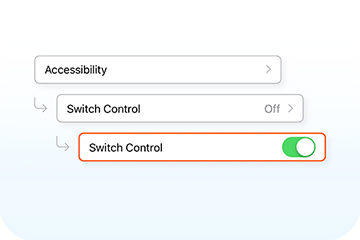
screenshot in iphone showing activating switch control in accessibility

4. Tap on Switch Control, then turn on the Switch Control button at the very top of the screen. Then tap on the second item on the list: Switches.

screenshot in iphone showing add new switch options once

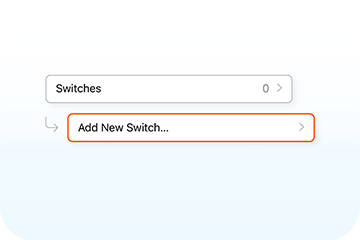
5. This will bring you to a page with just one option: Add New Switch. Tap on it.

screenshot in iphone showing selecting camera as a new

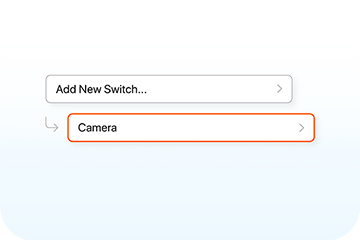
6. A page with three options will appear: External, Screen, and Camera. Apple uses the front-facing camera to detect head gestures, so tap Camera at the bottom of the list.

screenshot from iphone showing activating left and right head

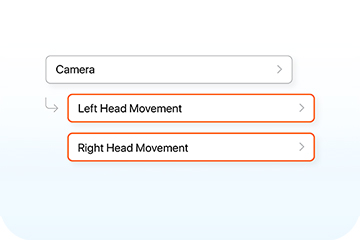
7. From here, you can choose what action your phone will take when you move your head left or right. This includes controlling the home button and accessing Siri. When head gestures are activated, your screen will have a blue outline around it, letting you know it can see your face. You can then open your web browser (or any other mobile app) and you will see the scroll function appear at the top of the screen as one of the menu options. If you move out of range or tilt your phone at a bad angle, a small message will appear at the top of the screen letting you know that your phone can’t register your movements.

If you’ve made it this far, congratulations! Your prize is never having to strain your joints scrolling through text messages again! And because the phone easily captures your movement, you don’t have to worry about throwing your neck out.

To recap, here’s a shortcut list: Settings > Accessibility > Switch Control. Tap that and toggle it on. Then, Switches > Add New Switch > Camera and then assign your desired actions to left and right head gestures.

For a larger look at all the accessibility features offered by Apple that can help you manage joint pain, take a look at their Accessibility website. Android devices and Apple laptops offer similar services but may require downloading additional apps.

Now you can navigate this website using just your head. Give it a try!

 Voltaren 23.2 mg/g Diclofenac Pain Relief Gel 12 Hourly for joint and back pain relief product (formerly Osteo Gel 12 Hourly)
Osteoarthritis-friendly easy open cap from Voltaren

We’re not just making your life easier online. We’re making sure getting relief in real life is also as seamless as possible. We know that many of you experience osteoarthritis in your hands and fingers, making it difficult to open jars, containers, bottles - and, yes, medications.

You can now officially remove Voltaren Pain Relief Gel 12 hourly from the list of things that might be difficult to open with mild osteoarthritis. That’s because getting relief is now made effortless for you with our easy open cap. We designed it specifically with you in mind. You can use the side of your hand or even just the edge of a table to easily flip open the cap to your Voltaren Pain Relief Gel 12 Hourly – fingers free. Getting relief has never been easier.

1“Arthritis Pain: Do’s and Don’ts” Mayo Clinic. https://www.mayoclinic.org/diseases-conditions/arthritis/in-depth/arthritis/art-20046440 Accessed 24 April 2020

*Voice search functionality is not available on iOS devices while using the Chrome browser.

Explore Voltaren’s products for pain relief

Let’s get you moving again. Try our range of medicated Voltaren gels and tablets, for effective pain relief. Find out which is the best fit for you.

Explore Voltaren’s products for pain relief- Chronic Pain
Relief options by pain type

Knee pain, elbow pain, back pain, neck pain. Pain relief is not one-size-fits-all. Whatever kind of body pain you’re experiencing - Voltaren can help you. Learn all about the causes, symptoms, and pain relief options for the type of pain you’re experiencing so you can get back to doing those little things that bring you joy.

Joint pain relief and management methods

Learn about joint pain relief to help you regain your joy of movement

Knee pain relief and management methods

Learn tips to strike the right balance and find relief for your knee pain

Back pain relief and management methods

Get back pain relief with these methods – so you can get moving again with joy

Osteoarthritis relief and management methods

Learn how to get relief for sore, achy joints